The PDF Booklet Maker creates printable booklet files locally in your browser. It supports saddle-stitch page order, duplex print layout, and multi-page grid imposition for handouts, manuals, reduced-size printing, contract attachments, and scanned documents.
Main Features
- Upload one PDF file and read its page count locally.
- Create booklet layouts with pages padded to a multiple of 4.
- Choose left binding or right binding for booklet reading direction.
- Generate outside and inside pages in duplex printing order.
- Use A4, A5, A3, Letter, Legal, or Tabloid paper.
- Choose landscape, portrait, or automatic orientation.
- Set margins, booklet page gap, and grid padding.
- Use 1×2, 2×2, 2×4, or 4×4 grid imposition.
- Rotate pages by none, 90° clockwise, 90° counterclockwise, or alternating directions.
- Generate and download the PDF locally without uploading the source file.
How To Use
- Click the upload area to choose a PDF, or drop a PDF into the upload area.
- Choose Booklet Layout or Grid Imposition.
- In Booklet Layout, set paper, orientation, binding side, margin, and page gap.
- In Grid Imposition, set grid mode, paper, orientation, rotation, and padding.
- Review the layout preview and estimated output pages.
- Generate the booklet PDF and download the new file.
Mode Differences
!PDF Booklet Maker mode differences
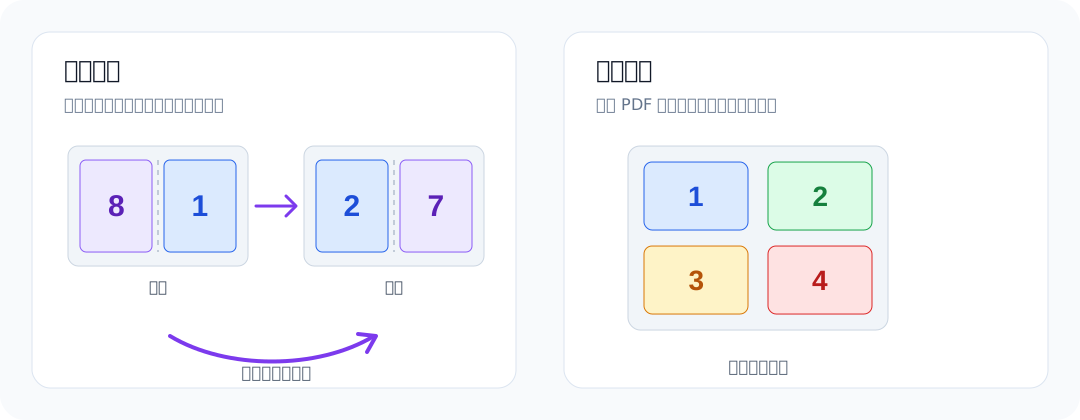
Booklet Layout rearranges pages into saddle-stitch duplex printing order, so the printed sheets can be folded and bound. If the page count is not a multiple of 4, blank pages are added automatically.
Grid Imposition places source pages in normal order on each sheet. It is useful for reduced-size printing, saving paper, and quick review, but it does not create saddle-stitch page order.
Notes
- Encrypted PDFs may need to be decrypted before processing.
- For booklet output, check the printer duplex flip setting before printing.
- Margins, gaps, or padding that are too large can leave no usable page area.
- Dense grids make each page smaller, so review the generated file before printing.
- All processing runs locally in the browser, and the current state is not kept after refresh.