PDF Bookmark to TOC creates body table-of-contents pages from existing PDF bookmarks. It is useful for reports, contracts, papers, ebooks, scanned files, and archive documents. Processing runs locally in your browser.
Key Features
- Upload one PDF and read its page count and bookmark count.
- Generate contents pages from the PDF bookmark hierarchy.
- Add clickable jump links for each contents entry.
- Adjust displayed page numbers after inserting new contents pages.
- Set the contents title, font size, and Latin font.
- Optionally add the new contents page to PDF bookmarks.
- Export and download the generated PDF locally.
TOC Page Diagram
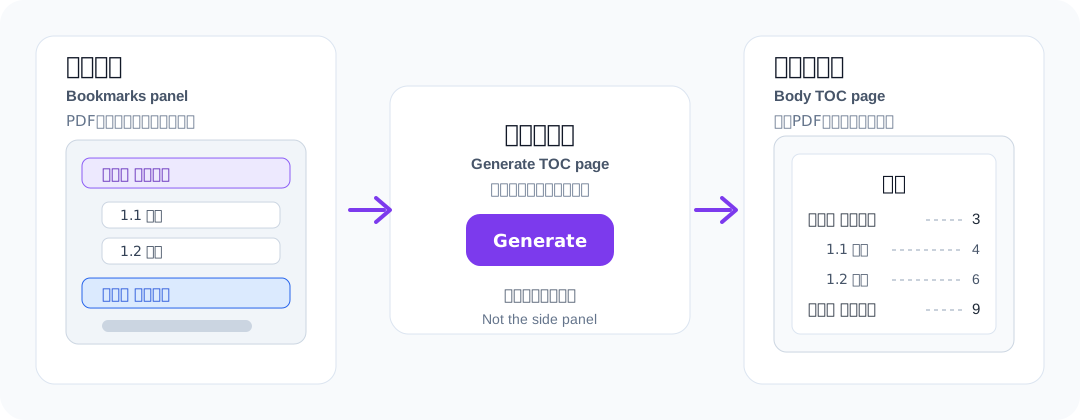
The left-side bookmarks are the source. The generated result is a clickable table-of-contents page inserted into the PDF body, not a replacement for the viewer bookmark panel.
How to Use
- Upload a PDF that already has bookmarks.
- Check the bookmark preview on the right.
- Set the contents title, font size, and bookmark option.
- Click Generate TOC PDF.
- Download the new PDF after processing completes.
Use Cases
- Add clickable contents pages to long reports with existing bookmarks.
- Prepare contracts, bids, papers, and manuals for review or delivery.
- Improve navigation for ebooks, archives, and scanned document bundles.
- Complete PDF body contents before publishing or handoff.
Notes
- This tool uses existing PDF bookmarks. It does not detect headings from page content.
- If the PDF has no bookmarks, add them first with the PDF Bookmark Editor tool.
- Encrypted PDFs may need to be decrypted before processing.
- CJK bookmark text is rendered with a local font when available.